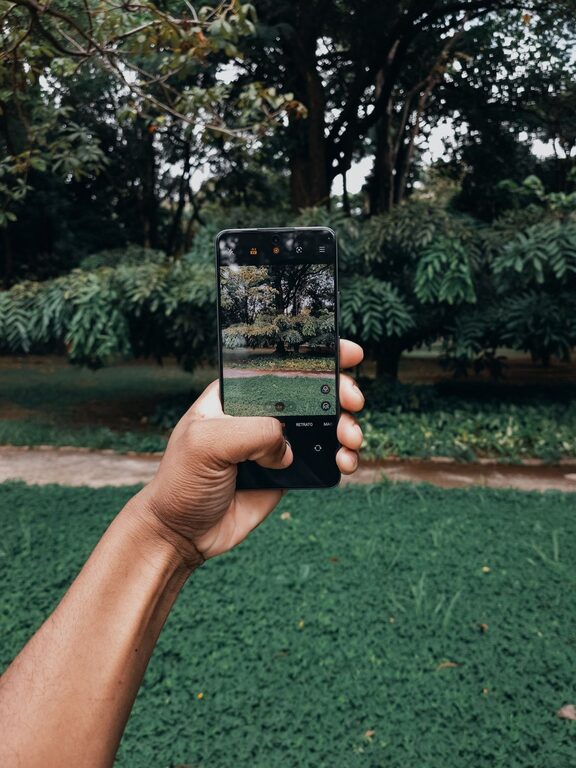
Taking photos with your phone is convenient and fun, but getting great shots can sometimes feel challenging. Whether you want to capture stunning landscapes, memorable moments with friends, or creative close-ups, a few simple tips can help you take better photos with your phone. This guide shares beginner-friendly advice to boost your phone photography skills easily and effectively.
Understand Your Phone Camera
Before diving into shooting, spend a little time exploring your phone’s camera settings and features. Most modern smartphones come with a variety of tools that can enhance your photos.
– Explore Camera Modes: Many phones offer modes like portrait, panorama, night, and pro/manual mode. Try them out to see what works best for different situations.
– Learn About Focus and Exposure: Tap the screen on your subject to set the focus. Adjust the exposure (brightness) by sliding your finger up or down, if your phone allows.
– Use the Grid Lines: Turn on the grid lines in your camera settings to help compose your shots using the rule of thirds, a key photography principle.
Master Lighting Basics
Lighting is one of the most important factors in photography. Good lighting can make your photos look professional, while poor lighting can ruin even the most interesting subject.
– Shoot in Natural Light: Whenever possible, use natural light. Early morning and late afternoon (known as golden hour) provide soft, warm light that enhances colors and textures.
– Avoid Harsh Sunlight: Midday sun can create harsh shadows and highlight imperfections. If shooting in bright daylight, seek shade or use a diffuser like a white cloth to soften the light.
– Use Available Light Sources Indoors: Position your subject near windows or lamps to take advantage of indoor lighting. Avoid direct overhead lights as they can cast unflattering shadows.
Keep Your Phone Steady
Blurry photos are often caused by shaky hands. Keeping your phone stable will improve the clarity and sharpness of your pictures.
– Hold Your Phone with Both Hands: This simple technique provides better support and minimizes camera shake.
– Lean Against a Stable Surface: Use walls, tables, or any solid object as support to steady your phone.
– Use a Tripod or Stand: Affordable phone tripods are widely available and great for more controlled shooting, especially in low light or for timed shots.
Focus on Composition
How you arrange elements in your photo makes a big difference in the final image. Good composition helps tell a story and guides the viewer’s eye.
– Use the Rule of Thirds: Imagine your frame divided into nine equal parts by two vertical and two horizontal lines. Place important elements along these lines or at their intersections for a balanced look.
– Fill the Frame: Get closer to your subject to eliminate distractions and emphasize details.
– Leading Lines: Use natural lines, such as roads, fences, or rivers, to draw attention toward the main subject.
– Simplify the Background: A busy or cluttered background can distract from your subject. Choose plain or blurred backgrounds when possible.
Avoid Common Mistakes
Being mindful of common pitfalls can greatly improve your phone photos.
– Don’t Use Digital Zoom: Zooming in with your phone often reduces image quality. Instead, move closer to your subject.
– Clean Your Lens: Fingerprints and dust can cause blurry or hazy images. Wipe your camera lens regularly with a soft cloth.
– Check Your Focus: Always make sure the subject is in focus before snapping the photo.
– Be Patient: Sometimes the best shot requires waiting for the right moment, especially when capturing people or moving subjects.
Experiment and Practice
The key to improving your phone photography is practice. Try different angles, lighting conditions, and subjects to discover what works best for you.
– Shoot in Burst Mode: Capture multiple shots quickly and pick the best one later.
– Edit Your Photos: Use photo editing apps to enhance your images by adjusting brightness, contrast, cropping, and applying filters.
– Study Other Photographers: Look at photos online or in magazines to get inspiration for composition, lighting, and subject matter.
Useful Apps for Phone Photography Beginners
Consider downloading apps designed to help you take better photos and edit them easily.
– Camera+ or ProCamera: Provide more control over settings like exposure and focus.
– Snapseed or Lightroom: Powerful, user-friendly editing tools for enhancing your photos.
– VSCO: Offers filters and editing presets for creative effects.
Final Thoughts
Taking better photos with your phone doesn’t require expensive equipment or professional training. By understanding your phone’s camera, paying attention to light and composition, and practicing regularly, you can capture images that are clear, vibrant, and meaningful. Keep experimenting, stay patient, and most importantly, enjoy the art of photography!
Happy shooting!
About the Author